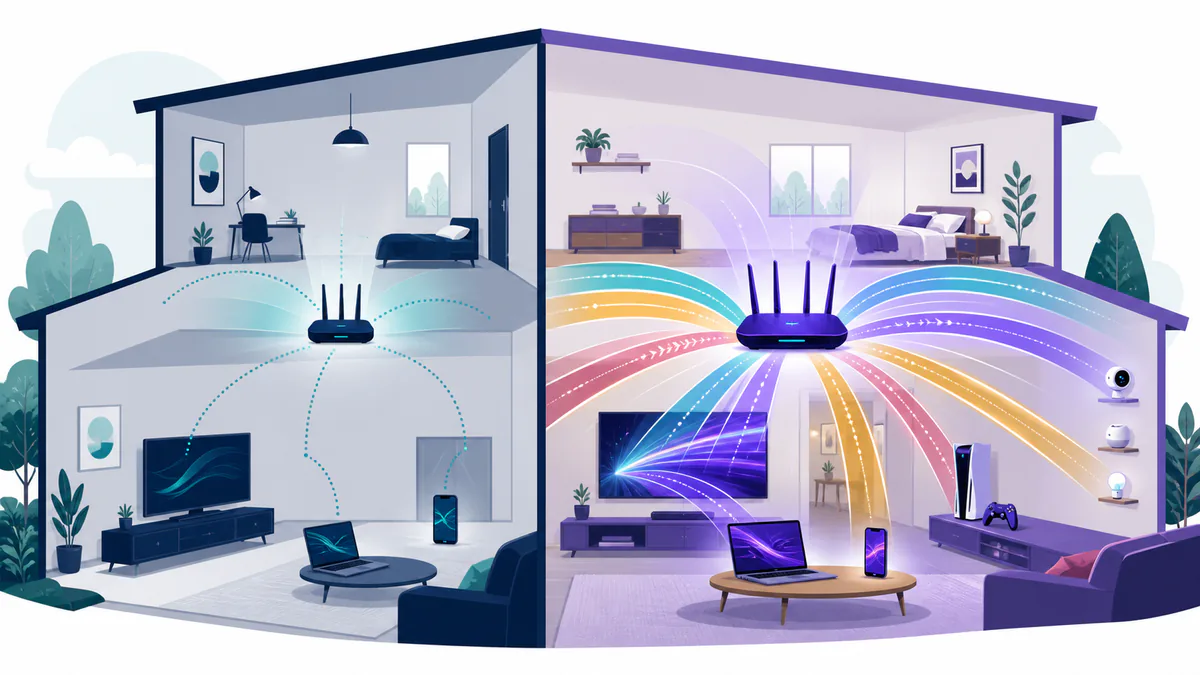
The short answer
Keep a good Wi-Fi 6 or Wi-Fi 6E system if it covers your home, stays stable and keeps up with your internet plan. Move to Wi-Fi 7 when you have compatible devices, multi-gig internet or fast local storage, and a clear need for more capacity or lower delay. A newer generation will not fix poor router placement or a weak incoming connection.
This guide is for home users deciding whether to keep, replace or buy a router. It compares channel width, real device speeds, latency, range and compatibility, then gives a buying checklist. Those details matter because a Wi-Fi 7 label can raise the price even when the rest of the network cannot use its new features.
WiFi 6 vs WiFi 7 at a glance
Wi-Fi 6 is the common name for IEEE 802.11ax. It was built to serve multiple devices more efficiently, including many connected devices working simultaneously. Wi-Fi 6E uses the same core wireless technology and adds access to the 6 GHz band.
Wi-Fi 7 is based on IEEE 802.11be. It keeps the useful parts of Wi-Fi 6, then adds wider channels and new ways to use more than one wireless link. The finished IEEE 802.11be-2024 standard is backward compatible with older Wi-Fi devices.
| Feature | Wi-Fi 6 and 6E | Wi-Fi 7 |
|---|---|---|
| Technical name | IEEE 802.11ax | IEEE 802.11be |
| Bands | 2.4 and 5 GHz; 6E adds 6 GHz | 2.4, 5 and 6 GHz on tri-band models |
| Widest channel | 160 MHz | 320 MHz in the 6 GHz band |
| Highest modulation | 1024-QAM | 4096-QAM, also called 4K QAM |
| Multiple links at once | No | Yes, through Multi-Link Operation |
| Best reason to buy | Good value and broad device support | Faster speeds and more capacity for busy networks |
Those are maximum capabilities. A router or phone may support only part of its generation's feature set. Your room, walls, channel traffic and client hardware also shape the WiFi speeds you see. For most homes, the key differences are capacity, channel width and how the network handles several devices at once—not a guaranteed speed jump for a single device.
What actually changes with Wi-Fi 7
Channels can be twice as wide
A wireless channel is a lane for data. A wider lane can carry more data when the spectrum is clear. Wi-Fi 6 tops out at 160 MHz. Wi-Fi 7 can use a 320 MHz channel, but that width lives in the 6 GHz band.
The Wi-Fi Alliance's Wi-Fi 7 launch details say 320 MHz doubles the widest channel available to the prior generation. In the United States, the FCC's 6 GHz rules permit unlicensed devices to use bandwidth up to 320 MHz. That makes the headline feature possible here.
There are two catches. First, a 320 MHz channel needs a clear block of spectrum. Nearby networks and router settings can force a narrower channel. Second, both the router and the client must support the same width. A 320 MHz router does not turn a 160 MHz laptop into a 320 MHz laptop.
Multi-Link Operation can combine paths
Older Wi-Fi clients normally use one band at a time. Multi-Link Operation, or MLO, lets a compatible Wi-Fi 7 client and router use more than one link across multiple frequency bands. The links may carry data together, or one may provide a cleaner path when another is busy.
That can raise throughput, cut delay and improve connection reliability. It can also help a mesh system use multiple bands with more freedom while devices connect concurrently. The result may be more stable connections and lower latency during simultaneous connections. But MLO is not one fixed mode. Hardware makers can support different link combinations, and software support matters. Check the exact router and device specifications before treating MLO as a sure result.
4K QAM packs in more data
Wi-Fi sends data by changing a radio signal in carefully defined steps. Quadrature amplitude modulation, or QAM, is one part of that wireless transmission. Wi-Fi 6 uses up to 1024-QAM. Wi-Fi 7 can use 4096-QAM, which lets a strong link transmit data more densely.
The Wi-Fi Alliance says Wi-Fi 7 uses 4096-QAM, improving data rates by 20% over Wi-Fi 6's 1024-QAM under suitable conditions. It needs a very clean, strong signal, though. You are most likely to get that gain near the router. It is not a promise of 20% more speed in every room.
A busy channel no longer has to be all or nothing
Interference can occupy part of a wide channel. Wi-Fi 7 adds more flexible puncturing and resource-unit controls, so a compatible system may use the clear parts instead of giving up the whole channel. Intel's Wi-Fi 7 feature guide describes this as Multi-RU puncturing.
This change matters most in dense environments. It can improve network efficiency and spectrum efficiency when neighboring radio traffic blocks part of a channel. It is not a new source of internet bandwidth.
Theoretical speeds need context
Wi-Fi speed labels mix several different ideas. Some figures describe all radios and spatial streams in an ideal access point. Others describe one client. Neither equals the speed of a file download from the internet.
The theoretical maximum for a full Wi-Fi 6 system is often listed as 9.6 Gbps across multiple channels and streams. The IEEE's Wi-Fi 7 standard defines a mode capable of at least 30 Gbps at the system level. A widely cited IEEE analysis of the developing standard calculated that Wi-Fi 7 can reach 46 Gbps with a single 320 MHz channel, 4096-QAM and 16 spatial streams. Those maximum data rates help compare technical ceilings, but they are not normal laptop results.
A more useful example is a two-stream client, which is common in phones and laptops. Intel lists up to 2.4 Gbps for its 2×2 Wi-Fi 6 adapters and up to 5.8 Gbps for a 2×2 Wi-Fi 7 adapter that supports 320 MHz and 4K QAM. These are still ideal link rates. Protocol overhead, signal quality and shared airtime lower usable throughput.
Real products also show why the generation name is not enough. Apple's current Wi-Fi specifications list MLO on supported Wi-Fi 7 iPhones and Macs, but many of those devices use 160 MHz channels and a maximum 2.4 Gbps physical link rate. That is the same listed peak as Apple's two-stream Wi-Fi 6E mode. Wi-Fi 7 can still help those devices through MLO and efficiency gains, but not through a 320 MHz client channel.
Your internet service provider may set a lower ceiling. A 500 Mbps connection will not produce faster internet speeds because the WiFi router advertises several gigabits. Fast wireless connectivity still helps with local backups, a home server and many active devices.
Does Wi-Fi 7 have better range?
Not by definition. Wi-Fi 7 uses the same 2.4, 5 and 6 GHz bands available to modern home networks. Its newer tools may hold a steadier link or use busy spectrum better, but the label does not make radio waves pass through more walls.
These Wi-Fi networks use the same bands, but band choice still matters:
- 2.4 GHz often reaches farther and passes through walls better, but it has less room for high speeds.
- 5 GHz offers a useful balance of speed and reach for many homes.
- 6 GHz offers more clean spectrum and the widest channels, but the signal usually weakens faster through walls.
Router placement, antenna design and mesh-node spacing often matter more than the wireless standard. Put the main router in the open and near the center of the space it serves. Do not hide it on the floor or inside a cabinet. If one router cannot cover the home, a well-placed mesh system or wired access point is a better fix than a more expensive router in the same bad spot.
Will old devices still connect?
Yes. A Wi-Fi 7 router can serve Wi-Fi 6, Wi-Fi 5 and many older clients. It is backward compatible, and the connection falls back to the best mode both sides share. An older client will not gain 320 MHz channels, 4K QAM or MLO, but it should still connect on a supported band.
That mixed network is normal. A new phone may use Wi-Fi 7 while a thermostat stays on 2.4 GHz Wi-Fi 4. The router handles each client based on its own abilities.
Older smart-home gear can still make setup awkward. Some smart home devices expect a 2.4 GHz network or do not work well with one combined network name during setup. Keep all your devices, current security mode and setup needs in mind when changing routers. If outdoor cameras are a large part of your network, our guide to subscription-free outdoor security cameras explains their storage and connection trade-offs.
When Wi-Fi 7 is worth buying
Wi-Fi 7 makes the strongest case when several parts of your network are ready for it.
You have multi-gig internet
A multi-gig internet plan can exceed a standard gigabit Ethernet port. To use it, your router needs a fast WAN port, and the path to your device also needs enough capacity. Look for 2.5GbE or faster ports where they matter. A low-cost Wi-Fi 7 router with only one multi-gigabit port may create a wired bottleneck.
If your laptop lacks Ethernet, a suitable USB-C hub with Ethernet can add a wired connection. The laptop port, hub and adapter speed all need to match the network.
You move large files inside the home
Fast local traffic is where wireless capacity can pay off even without a faster internet plan. A video editor copying projects to a network-attached storage box has a different need from a household that mainly streams shows. The storage device, network switch and wired router ports must also be fast enough.
Your new devices support Wi-Fi 7
Check the exact phone, computer, game system and headset. One Wi-Fi 7 client can use new features while older devices stay connected, but a house full of Wi-Fi 6 clients gives a new router fewer chances to show a difference. You need compatible devices to receive the full benefits.
Certification is useful because it tests a common feature set and interoperability. Still, read the product specifications for bands, channel width, MLO support, spatial streams and ports. A Wi-Fi 7 logo is the start of the check, not the end.
A wireless mesh needs more backhaul room
Mesh nodes must talk to each other as well as to your devices. A strong Wi-Fi 7 link can give that backhaul more capacity, especially when Ethernet is not available. It may also give busy networks more consistent performance as more devices come online. Results depend on node placement and the building. Wired backhaul remains the most predictable choice when you can install it.
The price gap is small
If you need a router now and a sound Wi-Fi 7 model costs only a little more than the Wi-Fi 6E system that meets the same needs, the newer system may be sensible. Compare the full hardware. Do not trade away useful ports, updates or coverage just to get a newer number.
When Wi-Fi 6 is still the better value
Keep or buy Wi-Fi 6 when the simpler system solves the real problem. For devices and internet plans under 1 Gbps, it can provide enough performance without paying for a higher theoretical ceiling.
- Your internet plan is 1 Gbps or slower.
- Most active devices use Wi-Fi 6 or older hardware.
- The current router already covers the home and stays stable.
- You want a mature mesh system at a lower price.
- Your main issue is a dead zone that better placement or another access point can fix.
The Wi-Fi Alliance's Wi-Fi 6 program includes OFDMA, multi-user MIMO, 160 MHz channels, target wake time, 1024-QAM and WPA3. That is a capable base for a busy home. Wi-Fi 6E adds 6 GHz if you need cleaner spectrum but not the rest of Wi-Fi 7.
Replacing a stable Wi-Fi 6 system may produce a small change for web browsing, video conferencing and ordinary streaming. Smart TVs, gaming consoles and other smart devices may remain limited by their own radios. Save the money unless you can name the bottleneck the new system will remove.
Check security and controls, too
Speed is only one part of a home network. Compare the router maker's update policy, guest-network controls and security settings. Some systems include malware protection or parental controls, while others put those features behind a paid plan. Check the current terms instead of assuming the feature comes with the Wi-Fi generation.
Automatic security updates are useful, but a router still needs a strong admin password and current firmware. A newer Wi-Fi standard does not make weak account security safe.
A simple buying checklist
Start with the limits outside the Wi-Fi label.
- Map the home. Note weak rooms, floors and dense walls.
- Check the internet plan. Match the router's WAN port to the service speed.
- List active clients. Focus on devices that move large amounts of data at the same time.
- Check each fast client's radio. Look for supported bands, channel width, MLO and spatial streams.
- Count wired ports. A fast Wi-Fi radio does not replace the right Ethernet ports.
- Plan mesh backhaul. Use Ethernet where practical; otherwise leave each node a strong wireless path.
- Check support. Favor clear update policies, automatic security updates and a long support window.
- Look for certification. It gives more confidence that devices from different makers will work together.
Do not pay for a combined speed label without checking each radio and port. Router names such as BE9300 add the theoretical rates of several bands. No single client receives that full total.
Wi-Fi 6 vs. Wi-Fi 7 for gaming
Wi-Fi 7 may lower latency when MLO gives traffic more than one path or avoids a busy channel. That may help cloud gaming, virtual reality and large local transfers. It cannot remove delay in the game server, internet route or cable connection to your home.
Ethernet is still the first choice for a fixed game PC or console when consistent delay matters. If a cable is not practical, use a strong 5 or 6 GHz signal, keep the router close and reduce extra wireless hops. Buy Wi-Fi 7 for a measured network need, not for a promise that every online match will feel different.
Common questions
Is Wi-Fi 7 always faster than Wi-Fi 6?
No. It has a higher ceiling, but the router, client, channel width, signal and network load set the result. A strong Wi-Fi 6 connection can beat a weak Wi-Fi 7 connection.
Do I need 6 GHz for Wi-Fi 7?
Wi-Fi 7 can work on 2.4 and 5 GHz, and MLO can use those bands. The widest 320 MHz channels require 6 GHz. Check that both the router and your key clients support the band.
Is Wi-Fi 6E the same as Wi-Fi 7?
No. Wi-Fi 6E extends Wi-Fi 6 into 6 GHz. It can use up to 160 MHz channels. Wi-Fi 7 adds features such as MLO, 4K QAM, flexible puncturing and up to 320 MHz channels.
Should I replace a working Wi-Fi 6 router now?
Usually not. Replace it when coverage, stability, capacity or port speed falls short. If it serves the whole home and keeps up with the internet plan, waiting is reasonable.
The practical verdict
Wi-Fi 7 brings significant improvements for a fast, crowded home network. Its wider channels, multiple links and better use of busy spectrum can support more connected devices with improved performance. It is most useful when the clients, wired ports and internet or local storage can match it.
Wi-Fi 6 remains a good choice for ordinary plans and mostly older devices. Before buying either one, fix placement and decide whether you need one router, mesh nodes or wired access points. The best generation is the one that removes a real limit in your home.